01 / OPEN WHAT YOU COPIED
Open my clipboard in Gravitas Crunch
OR SAY
Crunch clipboard
Open your copied link or text in the Reader. Start with the source, without running an analysis.
Don’t read. Watch.
Copy a link or some text. Tell Siri what you want. Crunch turns it into a broadcast, an audiobook, or research you can shape.
ON-DEVICE AI. NO DATA CENTERS.
Releases October 15, 2026.
START HERE / SIRI & SHORTCUTS
Copy a web link, an article passage, or a long AI response from another app. You bring the text. Siri gets you into the right Crunch flow.
Then say one full phrase below. The short versions are built in, too.
Open my clipboard in Gravitas Crunch
Crunch clipboard
Open your copied link or text in the Reader. Start with the source, without running an analysis.
Broadcast in Gravitas Crunch
Crunch broadcast
Crunch imports your source, creates an outline, and broadcasts it with your current settings. Replay, save, or share the result.
Play as an audiobook in Gravitas Crunch
Crunch audiobook
Read the full text aloud with on-device narration. No summary. No extra tap on Play. This uses what you just copied.
Just want the analysis? Say “Crunch it.” More Siri commands


MORE WAYS IN
Say “Hey Siri,” then the command. Open your station, return to your book, or turn copied text into research.
Crunch it
OR SAY THE FULL PHRASE
Crunch it in Gravitas Crunch
Import your clipboard and start an analysis in Research Assistant. Ask questions and shape the explanation from there.
Crunch radio
OR SAY THE FULL PHRASE
Open Robot Radio in Gravitas Crunch
Open Robot Radio and your personal broadcast network. No clipboard input needed.
Crunch Technology
OR SAY THE FULL PHRASE
Open Technology in Gravitas Crunch
Replace Technology with a station name: News, Science, Now, or My Station. Say “Crunch” followed by the station name.
Crunch open audiobook
OR SAY THE FULL PHRASE
Open my audiobook in Gravitas Crunch
Open your last-played audiobook at its saved place, ready for Play. Already listening? Keep listening. This does not import your clipboard.
WHAT YOU JUST COPIED
“Crunch audiobook”Import the clipboard and start listening.
THE BOOK YOU WERE ALREADY READING
“Crunch open audiobook”Open your last-played audiobook at its saved place.
Copy the page’s URL and use any clipboard command above. For a Share Sheet or on-screen workflow, create a Shortcut that accepts URLs and Safari Web Pages, enables Show in Share Sheet and Receive What’s On Screen, and passes the page URL to the Crunch action you want to run.
Animated presenters, on-device voices, and source imagery turn reading into a broadcast.
Ask questions. Change the tone, length, or focus. Choose the response that plays best.
Replay your segment, save the video, or share it through the system’s familiar controls.
Research becomes something you make
Start with an article, a paper, or an EPUB-length source. Crunch it, ask a question, then shape the answer for the audience you have in mind.
A technical briefing. A study segment. A more conversational explanation. Even a short product introduction. The conversation is your script editor.
Keep the performance.
Leave the generation waits out of the video.
“Make this an executive briefing.”
“Now explain it for someone new to the topic.”
“Keep the point. Make it shorter.”
A broadcast with a research workspace behind it
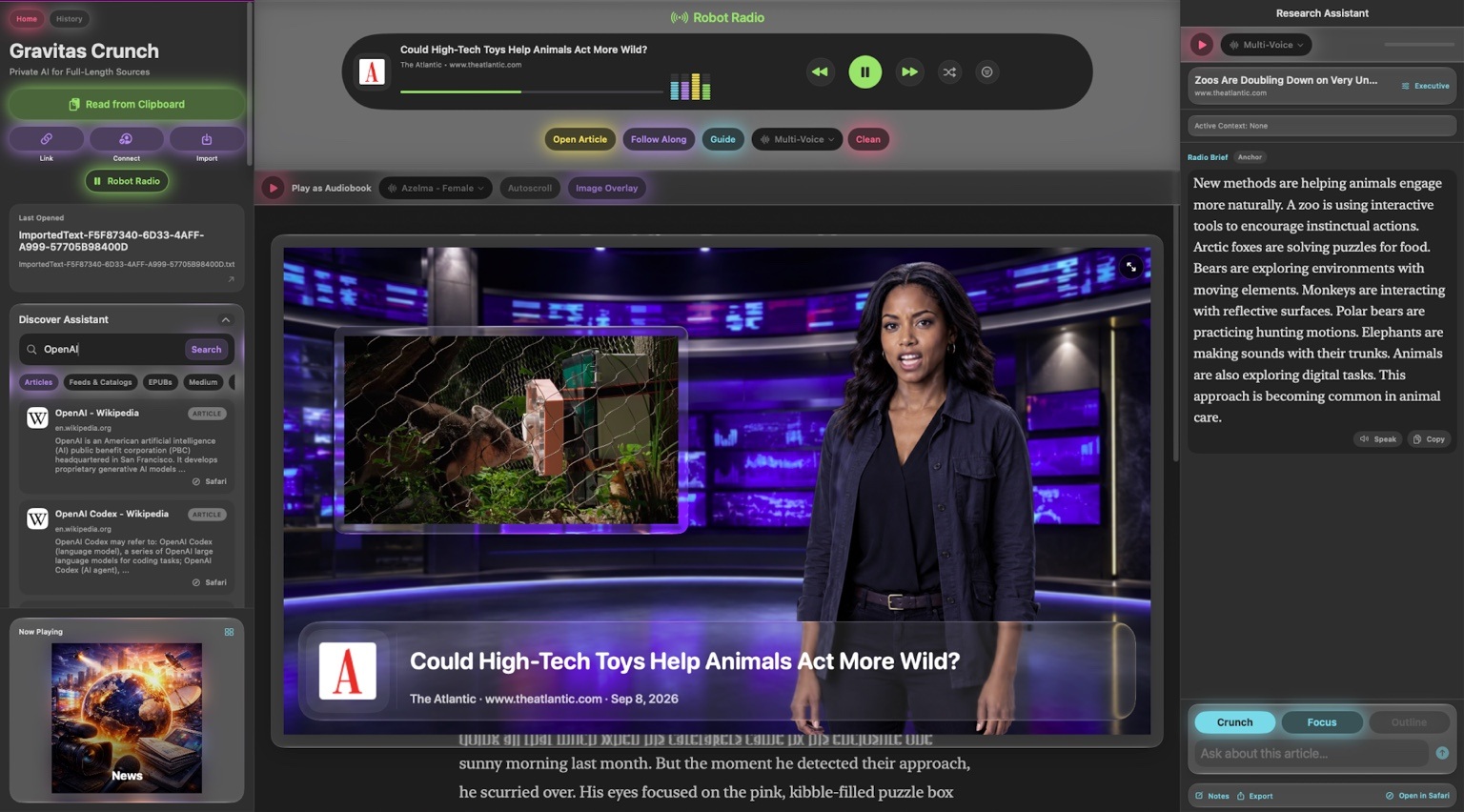
Discover on the left. Watch and read in the center. Research on the right. The source, the performance, and your questions belong in the same place.
01 / EXECUTIVE
Main ideas and high-level takeaways, organized so you can get your bearings before going deeper.
02 / TECHNICAL
Methods, assumptions, and deeper explanations for the questions a quick recap leaves behind.
03 / STUDY GUIDE
Concepts, definitions, and a review-ready structure for spending more time with what you’re learning.

Your interests. On air.
Robot Radio turns the feeds you follow into a continuous lineup of broadcast segments. Browse curated stations, tune into fresh stories with Now, or build your own mix in My Station.
Mind’s Eye adds animated presenters, layered sets, source imagery, and color-changing captions. Choose from 18 characters across six styles, with distinct on-device Qwen voices, or explore the cast with Shuffle.
Want the full article instead of the brief? Copy its link and say “Hey Siri, Crunch audiobook.” Listen with saved positions and section navigation.
Not another empty prompt box
Paste a link. Read from the clipboard. Import a file. Discover Assistant prioritizes newer dated articles in topical searches. Crunch is built around the material you actually want to spend time with.
Save sources for offline reading, return through History, and export research as text, Markdown, PDF, or a broadcast video.
Articles · PDF · EPUB · Plain text · Markdown
RSS · Atom · Substack · Medium · WordPress · Ghost
Wikipedia · arXiv · PubMed · DOI-linked papers · LaTeX
Supported YouTube, Vimeo, Reddit, and podcast sources
Available text, imagery, media, and transcripts depend on the source. Source media remains attributed to its publisher.
Gravitas Crunch runs its AI on your device. Apple Intelligence powers research. Qwen generates speech. Mind’s Eye builds the presentation. No account required. Your library stays on your device.
The future of AI in your pocket—not a data center.
AI summaries, research responses, and generated narration currently support English. Apple Intelligence features require a compatible device with Apple Intelligence enabled. Online sources require internet access.
A little more context
Start with a source you care about. There’s more than one way to experience it.
Contact supportCreated by Rich Fallat, bringing a character artist’s eye to the way information is presented.
Read the making-ofCopy a web link, a passage, or a long AI response from another app. Say “Hey Siri, Crunch broadcast” to watch a crunched outline, “Hey Siri, Crunch audiobook” to hear the full text, or “Hey Siri, Crunch clipboard” to open it in the Reader.
Mind’s Eye is Crunch’s real-time procedural 2D animation system. It combines authored presenter artwork, lip sync, subtle motion, layered sets, source imagery, and broadcast graphics. The artwork is prepared; each particular segment is assembled from the material being presented.
Yes. In the Research Assistant’s Broadcast workflow, select a response or the transcript and present it with an animated host. The finished segment can be replayed, saved, and shared. Generation waits and user pauses do not become dead time in the exported video; the voice’s intended pauses remain.
Use conversation to request a different length, tone, focus, or audience, then select the response to broadcast. Choose from the app’s available speaking voices. A requested duration is a creative target; the actual spoken length depends on the text and voice.
Crunch works from a structured, summarized representation of the material. Executive, Technical, Study Guide, and Focus offer different ways to work with it. Available citations link back to supporting passages. Generated answers can still contain mistakes; use the source to check important claims.
Robot Radio creates shorter, anchor-style reports from your feeds and stations. Article audiobook playback stays with the longer source in navigable sections. You can move from the report to the original article and then into deeper narration.
Mind’s Eye is built for iOS 27, with experiences across iPhone, iPad, Mac, and Apple Vision Pro. Apple Intelligence features require compatible hardware and Apple Intelligence turned on. Consult the App Store listing for current requirements on each platform.
Sources differ in what they make accessible. A podcast may not publish a transcript, an embedded video may have restrictions, or a page may not provide usable images. Reading and supported media remain available through the source view. For a problem report, include your device, system version, source URL, and what happened.